Showing posts with label computers. Show all posts

Thursday, February 24, 2011

Funny Webcomic

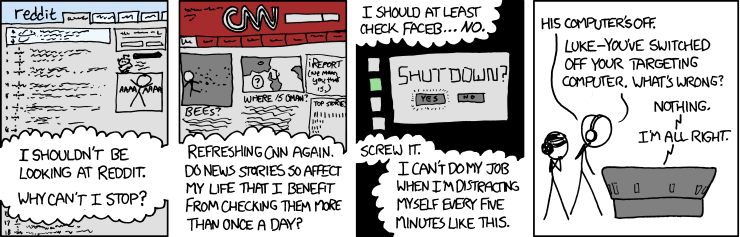
While browsing the online comic strip xkcd, which calls itself "A webcomic of romance, sarcasm, math, and language" (basically a nerd's webcomic), I came across the following:


For those who don't get this comic, why are you reading this blog? I'm kidding, of course. I'm sure we all remember the climax of the original Star Wars when Luke Skywalker is flying his X-wing down the Death Star trench while being chased by Darth Vader. He's trying to fire proton torpedoes down a small exhaust port and is relying on his targeting computer to get the torpedoes in. Earlier, most of the Rebel pilots had expressed doubt that even a computer could hit such a small target. This was seemingly confirmed when Red Leader was able to reach the port and fire off his torpedoes, but they only impacted the surface.


While concentrating on his computer, Luke hears the voice of the recently deceased Obi-Wan Kenobi telling him to "let go". Luke turns off his computer (which elicits a panicked comment from the control station) and relies on the Force to guide the torpedoes in. The comic is suggesting a slightly different reason why Luke had to turn off his computer.

Sunday, December 19, 2010

Do You Read Me, HAL?

It all started out with a spreadsheet that wouldn't open. Open Office would hang each time I tried to open it, blaming the problem on spoolsv.exe. I thought it odd that a program that manages document printing would prevent me from opening a file in the first place, but apparently it could. Thinking that spoolsv.exe might have been corrupted, I tried to replace it with a copy from my wife's computer. When that didn't work, I turned to Google. Someone mentioned something about printer drivers being the cause of the problem. However, when I tried to open the Devices and Printers window to access my printer properties, the window failed to open. Apparently problems with the Devices and Printers window are common, but the typical solution didn't work for me.

I downloaded a new copy of the printer driver from HP, hoping to force a reinstallation of the driver, but the installation hung. No matter what I did, it seemed like I couldn't uninstall or reinstall the printer or its drivers. With some help from Google, and a little experimentation, I found that by stopping print spooler in the Services window and then restarting it I could regain some function (I could access Devices and Printers again). However, once I rebooted the problem reappeared. It seemed that the more things I tried, the more problems I had. After a while explorer.exe started crashing because of this ridiculous printer problem.

Eventually I was able to uninstall and then reinstall the printer and its drivers by starting and stopping print spooler repeatedly. I had to stop it to open the Devices and Printers window, start it to uninstall the printer, stop and restart it to run the HP driver uninstall, and then stop it again for the driver uninstall to finish. It was all very frustrating. Once the accursed things were uninstalled, I rebooted the computer, it recognized the printer, and the needed drivers were installed automatically. I must have wasted at least three hours trying to figure the problem out.

My current computer, which has actually been very well behaved overall, is named HAL after my first computer. Every time I have computer problems, though, I'm reminded that I got the name from the murderously dysfunctional computer in 2001: A Space Odyssey.

Saturday, February 20, 2010

Computer Addicts

So, the wife is playing on the laptop (Bob), the kids are playing on the old desktop (Robby), and I'm playing on the newest edition to our family (HAL). It's amazing how you can have the entire family in just two adjacent rooms and yet have absolutely no personal contact.

HAL (pictures to be forthcoming) is truly a monster of a computer that was built for us by a coworker of mine. It has an AMD 2.61 GHz quad core processor, 4 GB of dual channel DDR3 RAM (it's the fatest RAM available; the sticks actually have their own heat sinks), one of the best video cards on the market (the card has its own cooling fans), dual 18.5" LCD monitors, and (my pride and joy) a solid state hard drive. The hard drive has no moving parts and some of the fastest read and write speeds you can find. HAL has a brag-worthy Windows performance index of 7.1 on a scale from 0 to 7.9.

I'm also pretty sure that HAL has absorbed a noticeable portion of my soul.

LinkWithin

Related Posts with Thumbnails